
Quick answer
Opus Clip is best for turning long content into viral snippets. CueClip is better for editing complete course lessons first, then exporting highlights as a second step.
CueClip vs Opus Clip: What matters for course creators
Opus Clip answers a different question than CueClip: “Which 30 seconds will perform on Shorts?” vs “How do I finish this lesson so students can learn?” Course creators who only clip often end up with great teasers and rough masters.
The durable stack is usually lesson-first. Clean the long-form asset in CueClip, then extract highlights — whether inside CueClip or with a clipping tool — so promo clips inherit the same cleaned audio and pacing.
What Opus Clip does well
Opus Clip is strong at ranking moments for social distribution. If growth depends on daily short-form volume, it earns its seat.
Where Opus Clip is stronger
- Fast short-form extraction and social framing
- AI-assisted repurposing for top-of-funnel clips
- Strong workflow for reels/shorts optimization

Where CueClip is stronger for long-form lessons
CueClip treats the full lesson as the product. Highlight extraction exists, but only after transcript cleanup makes the master worth clipping from.
Where CueClip is stronger
- Complete long-form lesson editing, not just clipping
- Transcript-led quality cleanup before publishing
- Better educational storytelling continuity
- Highlights workflow built on top of full edit quality
Feature differentiation table
This is the practical side-by-side view for people comparing Opus Clip alternatives, CueClip pricing, and long-form course editing outcomes.
| Capability | Opus Clip | CueClip |
|---|---|---|
| Screen & camera recording | Varies by tool | Yes (desktop app) |
| Transcript-first editing | Available | Yes, core workflow |
| Filler word removal | Varies by plan/tool | Yes, one-click workflow |
| Retake detection | Limited or manual | Yes, optimized for lecture cleanup |
| Silence and gap cleanup | Manual-heavy in many workflows | Built in |
| Highlight clip extraction | Strong short-form focus | Built in for lesson + promo |
| 4K export workflow | Tier or plan dependent | Yes |
| Pricing model | Subscription / recurring cost | Lifetime $149 one-time or $19/month |
Pricing and ownership comparison
For educators shipping every week, pricing model and ownership matter as much as features. This is where many creators start searching for a opus clip alternative in the first place.
| Decision factor | Opus Clip | CueClip |
|---|---|---|
| Base pricing pattern | Opus Clip uses recurring pricing | CueClip offers lifetime ($149) or $19/month |
| Cost predictability | Varies by usage and plan changes | More predictable for educators |
| Ownership | Access tied to subscription status | Lifetime: keep forever. Monthly: access while subscribed. |
| Best economic fit | Teams with broader media stack needs | Creators shipping weekly long-form lessons |
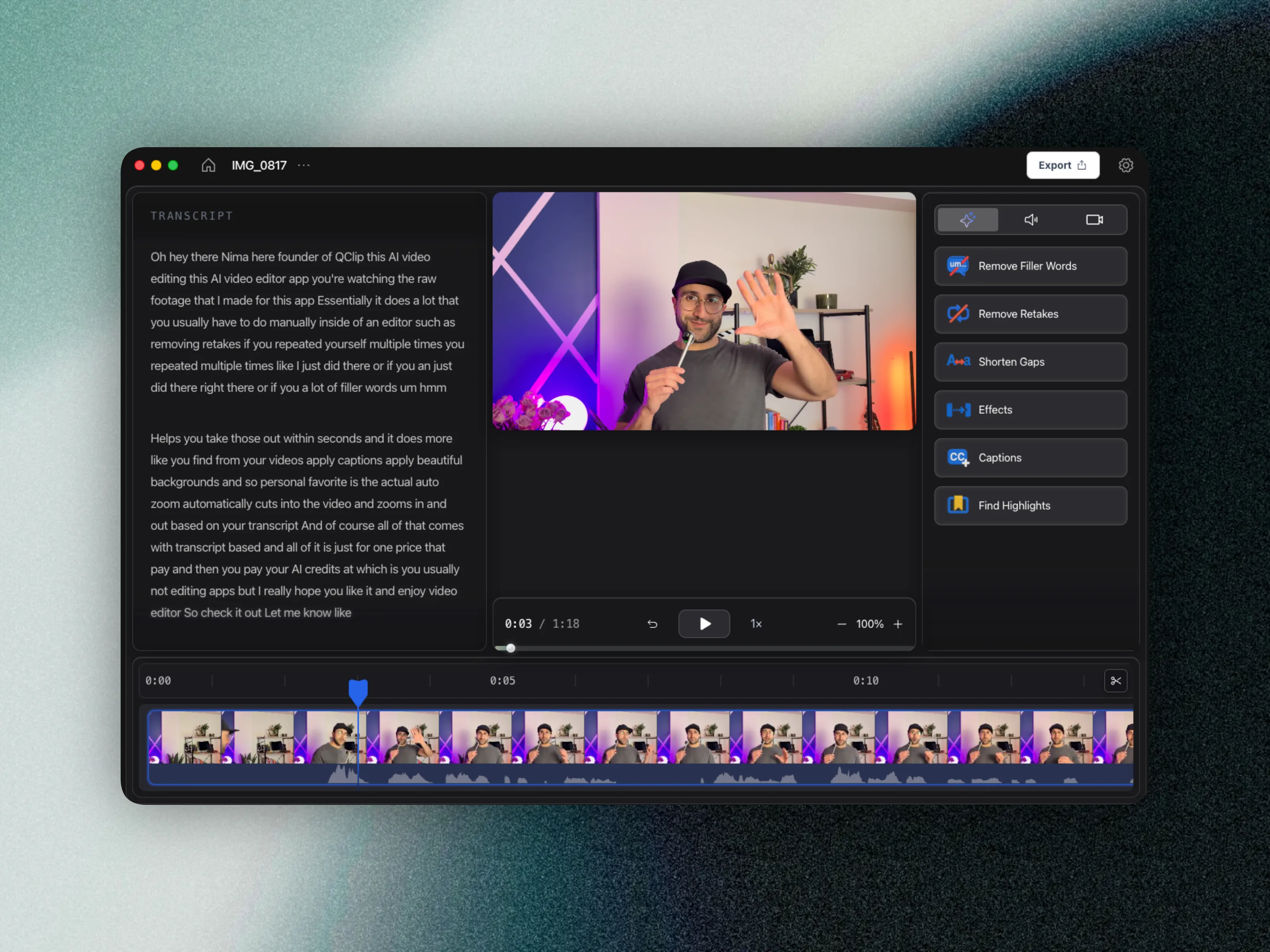
Why creators switch workflows
- Clipping a messy master multiplies filler words across every social cut.
- Paid students still need the full module finished on schedule.
- Course economics reward library depth more than one viral clip.
Clipping after cleanup
If Opus Clip is already part of your growth loop, keep it — but feed it cleaner long-form. Creators who reverse the order (clip first, fix later) often re-edit the same mistakes twice.
CueClip’s highlight tools cover many promo needs without a second subscription; use Opus Clip when you need specialized social packaging at high volume.
Who each tool is for
Opus Clip: Teams focused mainly on short-form distribution loops.
CueClip: Creators whose core product is full lessons, cohorts, and trainings.
FAQ: CueClip vs Opus Clip
Does CueClip record screen or camera?
Yes. The macOS desktop app can capture your screen or a window, with optional camera and microphone. When you finish recording, CueClip opens the footage as a project so you can edit immediately.
Is CueClip a good Opus Clip alternative for course creators?
Yes, especially if your workflow is lecture-heavy and you want transcript-first cleanup, faster edits, and more predictable ownership economics.
Who should stay with Opus Clip?
Creators whose primary use case matches Opus Clip's native strengths should stay there. This is not about replacing every tool, it is about choosing the right one for your highest-frequency workflow.
Does CueClip support long-form educational content better?
For most educators, yes. CueClip is optimized for cleaning spoken lessons quickly and producing publish-ready exports without forcing timeline-heavy complexity.
Related comparisons and guides
- CueClip vs Screen Studio
- CueClip vs CapCut
- CueClip vs Loom
- CueClip vs Submagic
- How to Edit Course Lectures Fast
- Best Auto-Edit Tools for Course Creators (2026)
- CueClip pricing
Final verdict
Both tools are strong when matched to the right workflow. If your priority is long-form educational editing speed with transcript-led cleanup, CueClip is usually the better fit.