
Quick answer
Final Cut Pro is excellent for timeline-heavy creative control on Mac. CueClip is stronger for transcript-driven educational editing where publishing speed and consistency matter most.
CueClip vs Final Cut Pro: What matters for course creators
Final Cut Pro is a one-time purchase powerhouse on Mac — attractive to educators who dislike subscriptions. The catch is time: magnetic timelines still demand editor instincts for every filler pass.
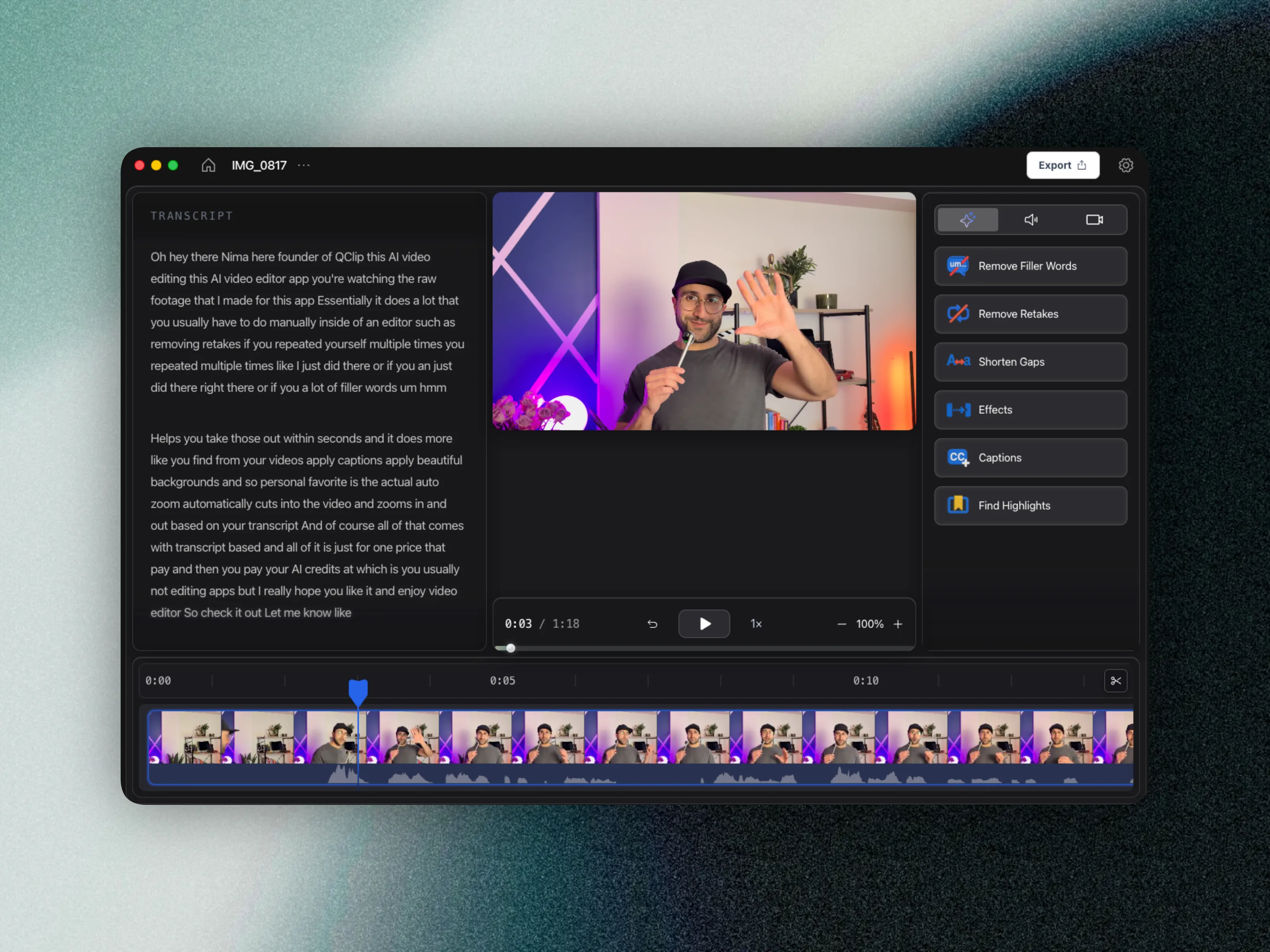
CueClip is also Mac-native, but optimized for spoken lessons. You trade deep timeline craft for transcript-first throughput when the goal is shipping modules weekly.
What Final Cut Pro does well
Final Cut Pro rewards creators who enjoy manual craft and want permanent ownership of a pro NLE.
Where Final Cut Pro is stronger
- Powerful Mac-native timeline editing performance
- Strong precision control for advanced edits
- Great for creators who enjoy manual craft
- One-time Final Cut license appeal

Where CueClip is stronger for long-form lessons
CueClip rewards creators who want ownership of their publishing cadence — cleanup that keeps pace with teaching, with lifetime or simple monthly pricing.
Where CueClip is stronger
- Lecture-focused transcript cleanup and pacing tools
- Faster production cycle for recurring lessons
- More approachable for non-editor educators
- Cleaner workflow from recording to publish-ready module
Feature differentiation table
This is the practical side-by-side view for people comparing Final Cut Pro alternatives, CueClip pricing, and long-form course editing outcomes.
| Capability | Final Cut Pro | CueClip |
|---|---|---|
| Screen & camera recording | Varies by tool | Yes (desktop app) |
| Transcript-first editing | Available | Yes, core workflow |
| Filler word removal | Varies by plan/tool | Yes, one-click workflow |
| Retake detection | Limited or manual | Yes, optimized for lecture cleanup |
| Silence and gap cleanup | Manual-heavy in many workflows | Built in |
| Highlight clip extraction | Available in limited workflows | Built in for lesson + promo |
| 4K export workflow | Tier or plan dependent | Yes |
| Pricing model | Subscription / recurring cost | Lifetime $149 one-time or $19/month |
Pricing and ownership comparison
For educators shipping every week, pricing model and ownership matter as much as features. This is where many creators start searching for a final cut pro alternative in the first place.
| Decision factor | Final Cut Pro | CueClip |
|---|---|---|
| Base pricing pattern | Final Cut Pro uses recurring pricing | CueClip offers lifetime ($149) or $19/month |
| Cost predictability | Varies by usage and plan changes | More predictable for educators |
| Ownership | Access tied to subscription status | Lifetime: keep forever. Monthly: access while subscribed. |
| Best economic fit | Teams with broader media stack needs | Creators shipping weekly long-form lessons |
Why creators switch workflows
- Owning Final Cut does not own back the hours spent scrubbing ums.
- Weekly course shipping favors automation over timeline mastery.
- You want recording and editing in one education-focused Mac app.
Two kinds of Mac ownership
Final Cut ownership is software ownership. CueClip lifetime ownership is closer to production-system ownership for educators: pay once (or $19/month), keep finishing lessons without building editor skills from scratch.
Who each tool is for
Final Cut Pro: Creators who want deep timeline craftsmanship and advanced fine-tuning.
CueClip: Course creators prioritizing speed, clarity, and consistent weekly publishing.
FAQ: CueClip vs Final Cut Pro
Does CueClip record screen or camera?
Yes. The macOS desktop app can capture your screen or a window, with optional camera and microphone. When you finish recording, CueClip opens the footage as a project so you can edit immediately.
Is CueClip a good Final Cut Pro alternative for course creators?
Yes, especially if your workflow is lecture-heavy and you want transcript-first cleanup, faster edits, and more predictable ownership economics.
Who should stay with Final Cut Pro?
Creators whose primary use case matches Final Cut Pro's native strengths should stay there. This is not about replacing every tool, it is about choosing the right one for your highest-frequency workflow.
Does CueClip support long-form educational content better?
For most educators, yes. CueClip is optimized for cleaning spoken lessons quickly and producing publish-ready exports without forcing timeline-heavy complexity.
Related comparisons and guides
- CueClip vs Screen Studio
- CueClip vs CapCut
- CueClip vs Loom
- CueClip vs Opus Clip
- How to Edit Course Lectures Fast
- Best Auto-Edit Tools for Course Creators (2026)
- CueClip pricing
Final verdict
Both tools are strong when matched to the right workflow. If your priority is long-form educational editing speed with transcript-led cleanup, CueClip is usually the better fit.