
Quick answer
Screen Studio is excellent for polished screen demos and product explainers. CueClip is usually better for lecture-style editing where transcript cleanup, retake removal, and long-form editing speed drive outcomes.
CueClip vs Screen Studio: What matters for course creators
Screen Studio earned its reputation by making Mac screen recordings look cinematic with almost no effort — zoom, cursor polish, and motion that marketers love. Course creators often try it after seeing a glossy product demo and wonder if it can also ship full lecture modules.
The mismatch shows up after the first 20-minute teaching take: Screen Studio optimizes for visual polish on short screen captures, while CueClip optimizes for cleaning spoken long-form lessons. If your bottleneck is filler words, retakes, and module pacing — not cursor trails — the tools diverge quickly.
What Screen Studio does well
Screen Studio is built for founders and marketers who need beautiful walkthroughs. Its defaults make UI demos feel finished without a motion-design pass.
Where Screen Studio is stronger
- Exceptional visual defaults for screen-demo content
- Fast camera/cursor motion polish with minimal setup
- Strong product-marketing video aesthetics out of the box
Where CueClip is stronger for long-form lessons
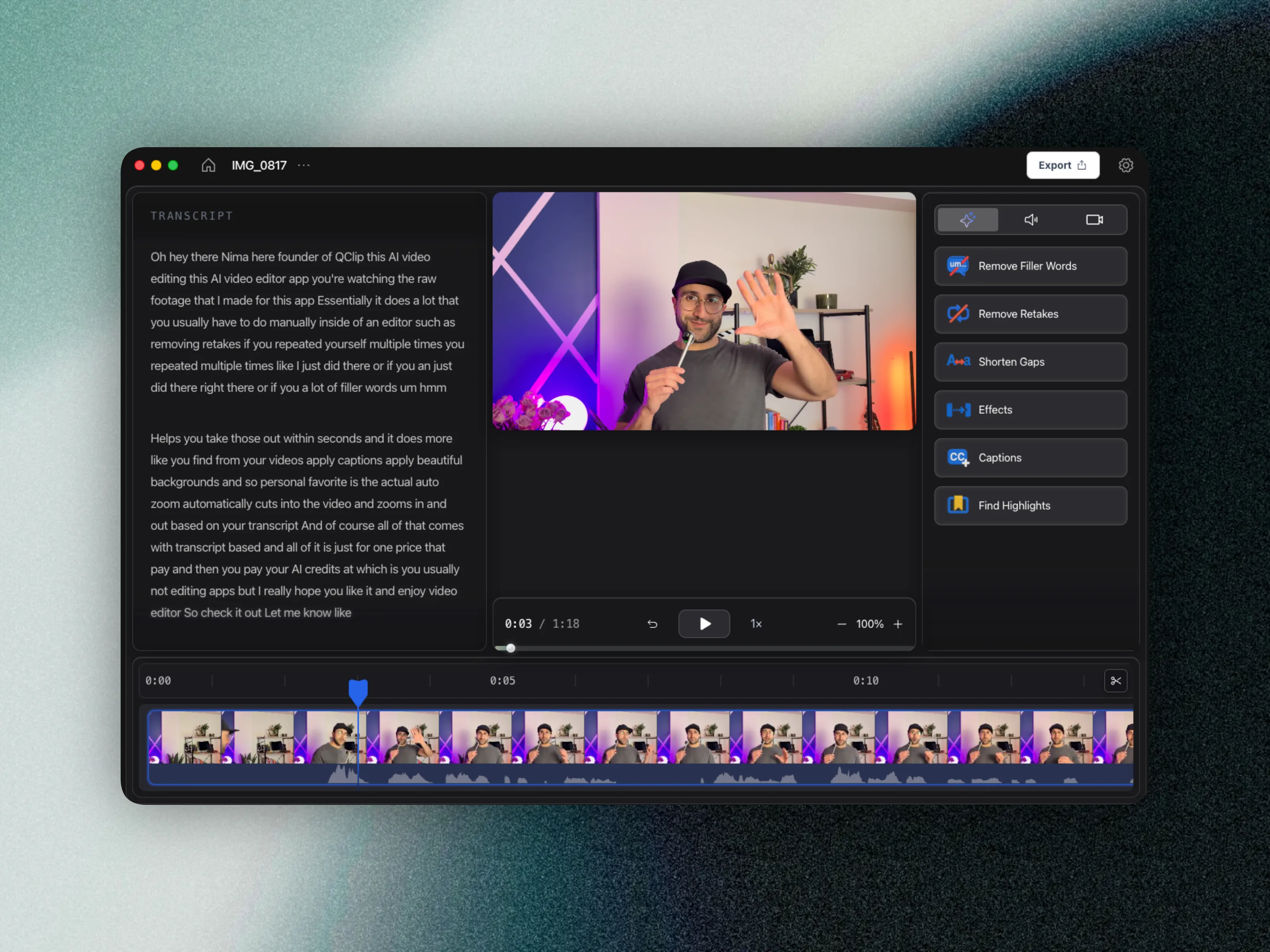
CueClip assumes you are teaching out loud for 15–60 minutes at a time. The transcript becomes the edit surface so you can remove ums, cut false starts, and tighten silences without scrubbing a timeline for every mistake.
Where CueClip is stronger
- Transcript-first editing designed for long educational recordings
- Automatic filler, retake, and gap cleanup for speaking content
- Better workflow for full course module production
- Ownership economics that fit recurring publishing schedules
Feature differentiation table
This is the practical side-by-side view for people comparing Screen Studio alternatives, CueClip pricing, and long-form course editing outcomes.
| Capability | Screen Studio | CueClip |
|---|---|---|
| Screen & camera recording | Varies by tool | Yes (desktop app) |
| Transcript-first editing | Available | Yes, core workflow |
| Filler word removal | Varies by plan/tool | Yes, one-click workflow |
| Retake detection | Limited or manual | Yes, optimized for lecture cleanup |
| Silence and gap cleanup | Manual-heavy in many workflows | Built in |
| Highlight clip extraction | Available in limited workflows | Built in for lesson + promo |
| 4K export workflow | Tier or plan dependent | Yes |
| Pricing model | Subscription / recurring cost | Lifetime $149 one-time or $19/month |
Pricing and ownership comparison
For educators shipping every week, pricing model and ownership matter as much as features. This is where many creators start searching for a screen studio alternative in the first place.
| Decision factor | Screen Studio | CueClip |
|---|---|---|
| Base pricing pattern | Screen Studio uses recurring pricing | CueClip offers lifetime ($149) or $19/month |
| Cost predictability | Varies by usage and plan changes | More predictable for educators |
| Ownership | Access tied to subscription status | Lifetime: keep forever. Monthly: access while subscribed. |
| Best economic fit | Teams with broader media stack needs | Creators shipping weekly long-form lessons |
Why creators switch workflows
- You started on Screen Studio for demos, then your course became mostly talking-head + slides.
- Editing time grows linearly with lecture length when polish tools are not transcript-driven.
- Lifetime or predictable monthly pricing matters more than cinematic cursor motion for weekly modules.
When Screen Studio still wins
Keep Screen Studio if your primary output is under five minutes, UI-heavy, and judged on motion polish — launch videos, feature announcements, and app tours. Many educators still pair both tools: Screen Studio for marketing clips, CueClip for the lesson library.
Choose CueClip when paid students are watching 30–90 minute modules and production debt from ums, retakes, and dead air is what delays publishes.
Who each tool is for
Screen Studio: Founders and marketers shipping polished app walkthroughs and launch clips.
CueClip: Course creators shipping weekly lessons, cohort modules, and training videos.
FAQ: CueClip vs Screen Studio
Does CueClip record screen or camera?
Yes. The macOS desktop app can capture your screen or a window, with optional camera and microphone. When you finish recording, CueClip opens the footage as a project so you can edit immediately.
Is CueClip a good Screen Studio alternative for course creators?
Yes, especially if your workflow is lecture-heavy and you want transcript-first cleanup, faster edits, and more predictable ownership economics.
Who should stay with Screen Studio?
Creators whose primary use case matches Screen Studio's native strengths should stay there. This is not about replacing every tool, it is about choosing the right one for your highest-frequency workflow.
Does CueClip support long-form educational content better?
For most educators, yes. CueClip is optimized for cleaning spoken lessons quickly and producing publish-ready exports without forcing timeline-heavy complexity.
Related comparisons and guides
- CueClip vs CapCut
- CueClip vs Loom
- CueClip vs Opus Clip
- CueClip vs Submagic
- How to Edit Course Lectures Fast
- Best Auto-Edit Tools for Course Creators (2026)
- CueClip pricing
Final verdict
Both tools are strong when matched to the right workflow. If your priority is long-form educational editing speed with transcript-led cleanup, CueClip is usually the better fit.