
Quick answer
CueClip and Descript are both AI-powered video editors, but they serve very different needs. Descript is a full-featured web-based platform with screen recording, podcasting tools, and deep collaboration — but its new AI credit system caps heavy users at 80 AI actions per month and can burn through quickly. CueClip is a native desktop app with built-in screen and optional camera recording, built exclusively for course creators: choose a $149 lifetime license or $19/month subscription, with included AI credits ($10 once or $5/mo), 4K export, and a Bring Your Own Key (BYOK) model — OpenAI, Claude, or Deepgram — for usage at cost. If Descript’s price increases and credit limits have started to sting, CueClip is the most direct alternative.
Descript Used to Be a Steal. Then the Credits Happened.
If you’ve been using Descript for a while, you probably remember when it felt like an unfair advantage. You could drop in a video, click “Remove filler words,” and watch your “ums” and “ahs” disappear in seconds. Transcript-based editing was genuinely revolutionary for course creators and educators who were spending hours scrubbing timelines.
But something shifted. Descript introduced an AI credit system that meters nearly every AI-powered action — filler word removal, overdub, scene detection, the works. On their current plans, new users get as few as 80 AI actions per month before they have to pay more or upgrade. Legacy users who were grandfathered into older pricing have seen those plans disappear or increase significantly. Community forums and subreddits are full of the same complaint: “I edited one long video and blew through my credits.”
That frustration has sent a lot of course creators looking for a Descript alternative that doesn’t feel like you’re feeding a parking meter every time you click Remove Filler Words. This article is an honest look at both tools — what each does well, where each falls short, and who each one is actually built for.
What Is Descript?
Descript is a cloud-based video and audio editor that pioneered transcript-based editing. Rather than dragging clips on a timeline, you edit the transcript like a document and the video follows. It supports screen recording, multi-track audio editing, overdub (AI voice cloning), and publishing directly to a handful of platforms.
For its intended audience — podcasters, video journalists, and marketing teams who collaborate in real-time — Descript is genuinely excellent. The web-based architecture means your editor is always up to date and projects live in the cloud. If you’re working with a team that all needs access to the same project, the collaborative workflow is hard to beat.
Where Descript Shines
- Transcript-based editing is intuitive and fast for simple cuts
- Screen recording built directly into the app
- Multi-track audio editing for podcast producers
- Real-time collaboration and cloud storage
- Overdub AI voice cloning for corrections
These are real strengths. If your workflow leans heavily on any of the above, Descript may still be the right tool. This article isn’t a hit piece — it’s about fit.
What Is CueClip?
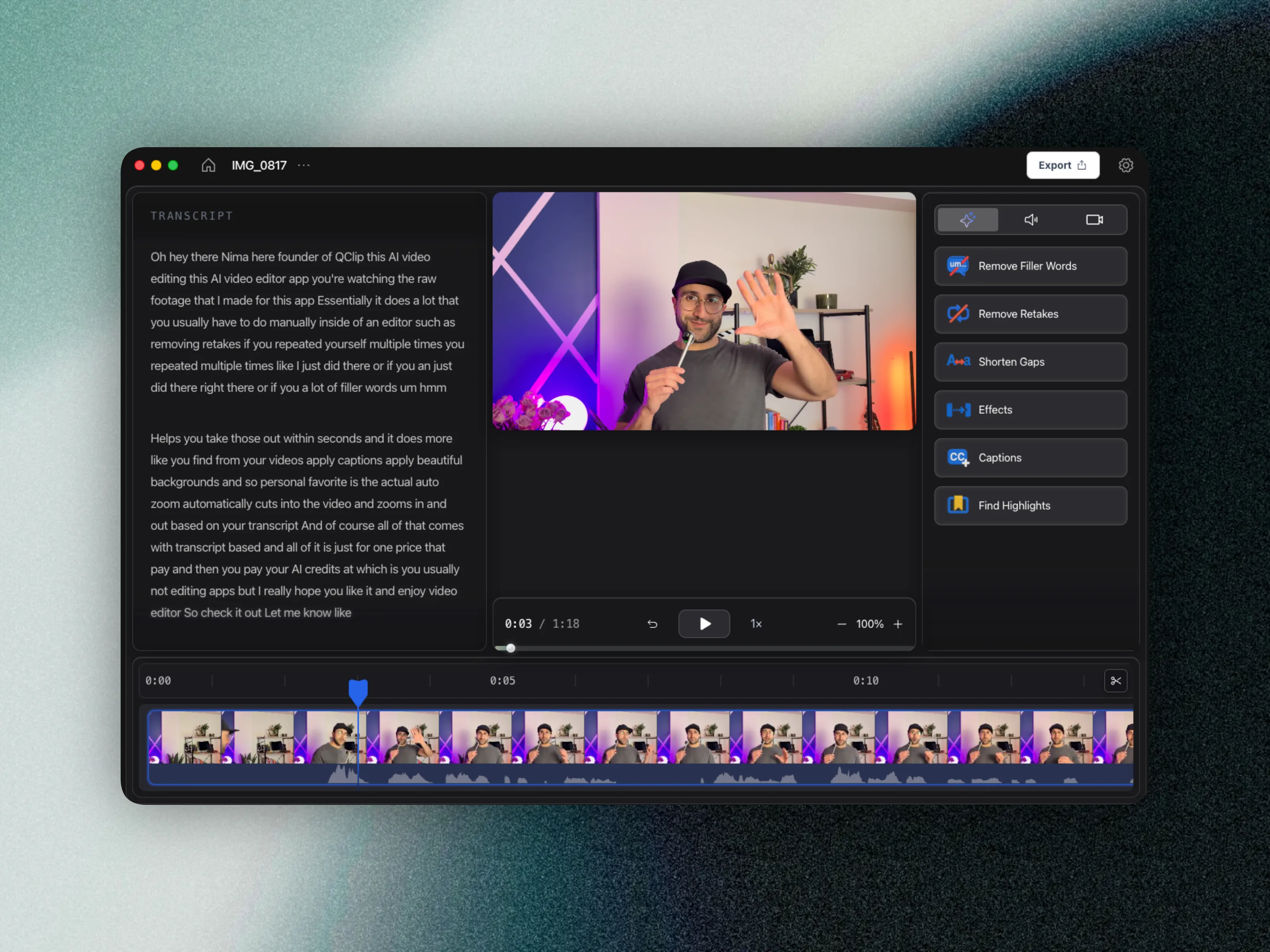
CueClip is an AI video editor built specifically for course creators, online educators, and coaches who record lecture-style videos and need to turn raw footage into polished lessons — fast. CueClip offers a $149 lifetime license (one-time) or a $19/month subscription. Lifetime includes $10 in AI credits once; monthly includes $5/mo in credits that reset each billing cycle. You can also connect your own OpenAI, Claude, or Deepgram key and pay at cost.
The core workflow is simple: record your screen or camera in the app or drop in existing video, let CueClip detect filler words, awkward pauses, and retake segments, apply any polish (backgrounds, captions, auto-zoom), and export at up to 4K — all without watermarks.
What CueClip Does
- Filler word removal — automatically detects and removes “um,” “uh,” “like,” and other disfluencies in one click
- Retake cutting — identifies when you restarted a sentence and keeps only the best take
- Awkward pause trimming — shortens or removes dead air to keep lessons flowing
- Auto-captions — generates and burns in accurate captions styled to your preference
- Background replacement — swaps your background to clean gradients or custom visuals
- Auto-zoom effects — adds dynamic zooms (subtle, smooth, or dramatic) without keyframing
- Highlight clip detection — finds the best 60–90 second moments from longer lessons for short-form content
- 4K export — full resolution output, no watermarks, ever
- Bring Your Own Key (BYOK) — connect your own OpenAI, Claude, or Deepgram key and pay at cost with zero markup
- Local AI model — start free with the included local model before connecting any API key
The BYOK model is particularly notable. Rather than Descript’s approach of bundling AI costs into subscription tiers and metering actions, CueClip lets you connect your own OpenAI, Claude, or Deepgram key and pay exactly what that provider charges — with no CueClip markup. For heavy users who edit multiple videos a week, the savings add up quickly.
Side-by-Side Feature Comparison
Here’s a direct look at how the two tools stack up on the features that matter most to course creators:
| Feature | Descript | CueClip |
|---|---|---|
| Filler word removal | Yes (costs AI credits) | Yes (included credits + BYOK) |
| Retake / mistake detection | Limited | Yes |
| Auto-captions | Yes | Yes |
| Background replacement | No | Yes |
| Auto-zoom effects | No | Yes |
| Highlight clip detection | No | Yes |
| Screen & camera recording | Yes (web) | Yes (desktop app) |
| Multi-track audio editing | Yes (pro tiers) | No |
| Real-time collaboration | Yes | No |
| AI credit / action limit | 80 actions/month (base plan) | $10 once (lifetime) or $5/mo (subscription) |
| Pricing model | Monthly subscription | Lifetime $149 or $19/mo |
| Export quality | Up to 4K (paid tiers) | 4K always |
| Watermark-free export | Paid plans only | Always |
| Bring Your Own API Key | No | Yes (OpenAI, Claude, or Deepgram) |
| Local AI model | No | Yes (included free) |
| Cloud-based | Yes | No (desktop app) |
| Platform | Web | Mac (Windows coming) |
Pricing Comparison: Where the Real Difference Lives
This is where the comparison gets stark. Descript operates on a tiered subscription model. Their base “Hobbyist” plan is free but heavily limited. Their “Creator” plan runs around $24/month, and their “Business” plan goes up from there. AI features are gated by a credit system layered on top — so even if you’re paying $24/month, you still only get a defined number of AI actions before you run out.
CueClip’s model is different by design:
| Other Editors | CueClip |
|---|---|
| Monthly Only | Subscription or One-time |
| Marked-up AI Cost | Bring Your Own Key — pay at cost |
| Confusing Credits | Keep Track of Your Usage |
| 720p / Limited Export | 4K Export, always |
| Watermarked on lower tiers | Never Watermarked |
| You Rent the Tool | You Own It, Forever |
The math is straightforward. A Descript Creator subscription costs $288/year. By the end of year two, you’ve spent $576 and still don’t own the tool — the day you stop paying, your access ends. CueClip at $149 one-time (lifetime) or $19/month includes included AI credits and one year of software updates on lifetime. After year one on lifetime, you keep the app forever and can connect your own OpenAI, Claude, or Deepgram key; new updates require an optional renewal.
On top of the subscription cost, Descript’s AI features consume credits. Running filler word removal on a 30-minute lecture can burn through a meaningful chunk of your monthly allocation. In contrast, CueClip’s BYOK model means you’re paying that provider’s API prices directly (OpenAI, Claude, or Deepgram) — typically fractions of a cent per minute of audio processed — with no additional markup from CueClip. You also get $10 in included AI credits with a lifetime license (or $5/mo with a subscription), which covers approximately 1,600 minutes (lifetime) or 800 minutes per month (subscription) of video.
Who Is Each Tool Best For?
Descript Is a Better Fit If You…
- Run a podcast and need multi-track audio editing
- Collaborate with a remote team that needs simultaneous access to projects
- Prefer a browser-based editor that works on any OS with cloud-hosted projects
- Use AI voice cloning (Overdub) for corrections
- Primarily edit short-form videos or marketing clips with modest AI usage
CueClip Is a Better Fit If You…
- Create online courses, coaching content, or educational videos
- Edit lecture-style recordings where filler words and retakes are your main cleanup task
- Want to pay once and own your tool outright
- Are frustrated by credit limits running out mid-project
- Want 4K export and no watermarks without a premium subscription
- Are comfortable connecting your own OpenAI, Claude, or Deepgram key
- Want automated visual polish (backgrounds, captions, zoom) without learning After Effects
- Want screen or camera capture and editing in one native desktop app
- Work on a Mac and want a native desktop experience
Why Course Creators Are Switching Away from Descript
To be clear: many of the course creators moving away from Descript still respect the product. The frustrations aren’t really about the core editing experience — they’re about the business model that’s been layered on top of it.
1. The AI Credit System Burns Through Fast
Descript’s current pricing separates the base subscription from AI usage. Even on paid plans, AI actions are metered — and for course creators who edit multiple videos per week, 80 AI actions per month disappears quickly. A single 45-minute lecture with filler word removal, scene detection, and cleanup can chew through a week’s worth of credits in one session. Creators who record regularly report hitting their limit within the first week of the month.
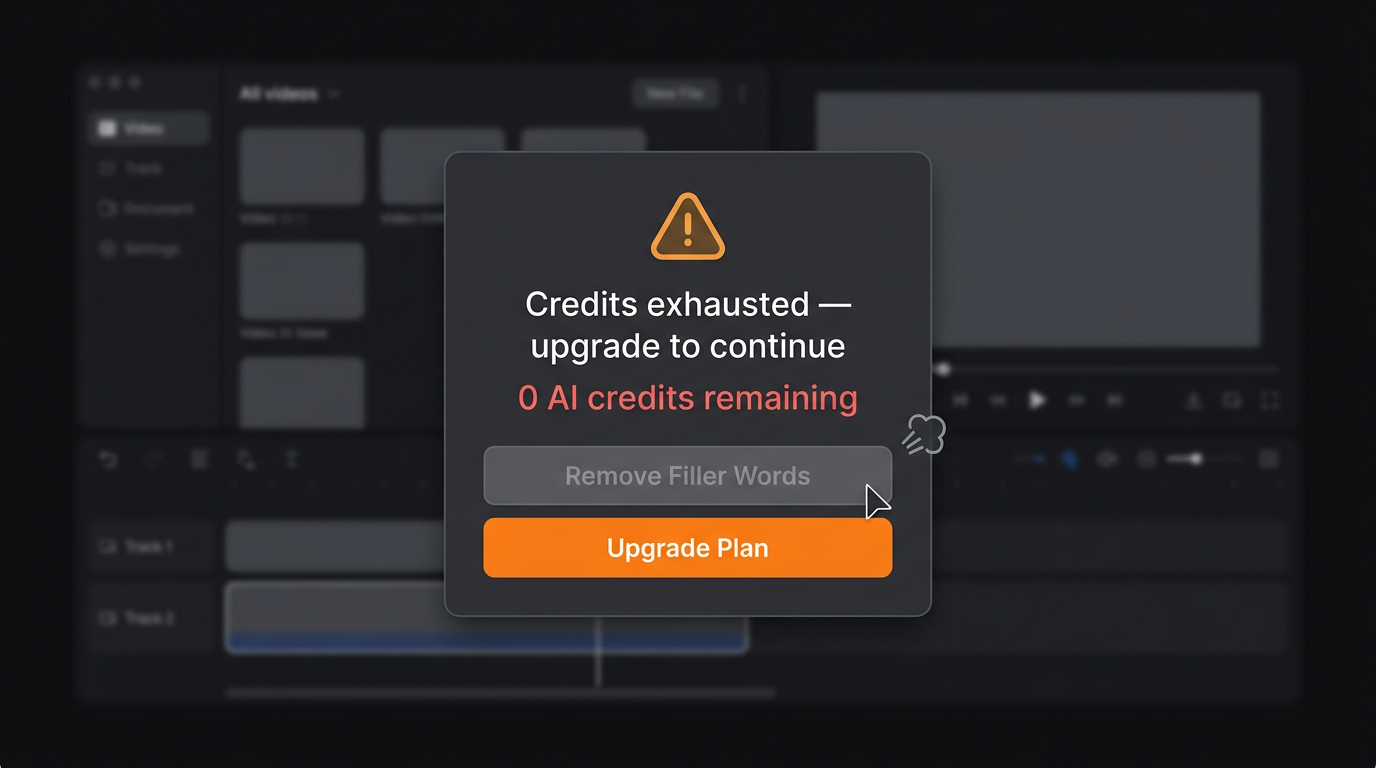
The dreaded modal — credits run dry mid-edit, filler word removal grayed out.
2. Filler Word Removal Is Gated Behind Credits
This one stings the most, because filler word removal is the feature that got most course creators onto Descript in the first place. In earlier versions of the product, it felt free and instant. Today, every filler word removal action is counted. For educators recording dense technical content where “ums” and restarts are frequent, this means the very feature they signed up for is now rationed. Several creators have noted the psychological shift of watching a credit counter tick down while editing — it changes how you work.
3. Legacy Plan Price Increases Broke Trust
A significant segment of Descript’s most loyal users were on grandfathered plans that predated the credit system. When those plans were deprecated or repriced, the reaction was swift — and vocal. Threads across Reddit, Twitter, and ProductHunt surfaced users who felt blindsided. The trust cost of that transition may have been more damaging than the dollar amount itself.
4. Batch Editing Burns Credits Disproportionately
Course creators don’t just edit one video at a time. A cohort launch might mean recording eight modules in a week. A live workshop gets split into five clips. In these scenarios, batch processing is essential — and batch processing burns through Descript’s AI credit allotment even faster. What might feel like generous usage limits for a casual podcaster becomes a hard constraint for a prolific course creator on a launch timeline.
5. The “Descript Too Expensive” Calculation Has Changed
When Descript was ~$10/month with unlimited AI, the value proposition was obvious. At $24+/month with a credit cap, the math is different — especially when AI video editing alternatives now exist at a fraction of the cost. The phrase “descript too expensive” has become a consistent search query for a reason: the product hasn’t gotten worse, but the value equation has shifted.
Final Verdict: CueClip vs Descript for Course Creators
Descript remains a genuinely powerful tool. If your workflow leans on collaboration, podcasting, or multi-track cloud production, it may still be the right choice. The transcript-based editing paradigm is elegant, the team clearly cares about the product, and the web-based architecture is genuinely convenient.
But if you’re a course creator whose primary loop is: record → clean up filler words and retakes → add some polish → export at full quality — CueClip is purpose-built for that workflow in a way that Descript no longer is.
The combination of flexible pricing ($149 lifetime or $19/mo), included AI credits with BYOK fallback, 4K export, no watermarks, OpenAI/Claude/Deepgram key support, and tools like built-in screen and camera recording, auto-captions, background replacement, auto-zoom, and highlight detection makes CueClip one of the strongest Descript alternatives for course creators available today.
Pay once for lifetime, or subscribe monthly. Edit with included AI credits or your own OpenAI, Claude, or Deepgram key.
| Descript | CueClip | |
|---|---|---|
| Best for | Podcasters, teams, marketers | Course creators, educators |
| Pricing | $24+/month | $149 lifetime or $19/mo |
| AI limits | 80 actions/month (base) | $10 once or $5/mo included |
| Export quality | Limited on lower tiers | 4K, always |
| Watermark-free | Paid plans only | Always |
| BYOK (OpenAI, Claude, or Deepgram) | No | Yes |
| Owns the tool? | No (subscription) | Lifetime: yes · Monthly: while subscribed |
Ready to switch?
Try CueClip — lifetime or monthly.
$149 lifetime (includes $10 in AI credits once) or $19/mo (includes $5/mo in AI credits). Connect your own OpenAI, Claude, or Deepgram key anytime. Monthly access ends when you cancel.
Lifetime $149 · $19/mo subscription · OpenAI/Claude/Deepgram BYOK