
Quick answer
Loom is ideal for quick async recording and sharing. CueClip is better when you need to transform raw recordings into polished educational videos that people pay to watch — filler cleanup, retake removal, captions, and publish-ready exports.
CueClip vs Loom: What matters for course creators
Loom made async video normal: hit record, share a link, move on. For internal updates, bug walkthroughs, and teammate feedback, that frictionless loop is still unmatched. Course creators often start there too — then hit a wall when the same raw Loom becomes a paid lesson.
The CueClip vs Loom decision is not “which recorder is better.” It is whether your output needs production cleanup. Loom optimizes for capture-and-share speed. CueClip optimizes for turning spoken recordings into modules students finish without wincing at ums, long pauses, and false starts.
If buyers are paying for curriculum, link-sharing quality is usually not enough. They expect pacing, captions, and a finished feel — even when the teaching is excellent.
What Loom does well
Loom is a recording and sharing product first. Instant links, comments, and lightweight trimming make it perfect for workplace communication and fast demos where polish is optional.
Where Loom is stronger
- Extremely low-friction recording and sharing
- Great for internal updates and async collaboration
- Simple link-based distribution without an export step
- Familiar for teams already standardized on Loom

Where CueClip is stronger for long-form lessons
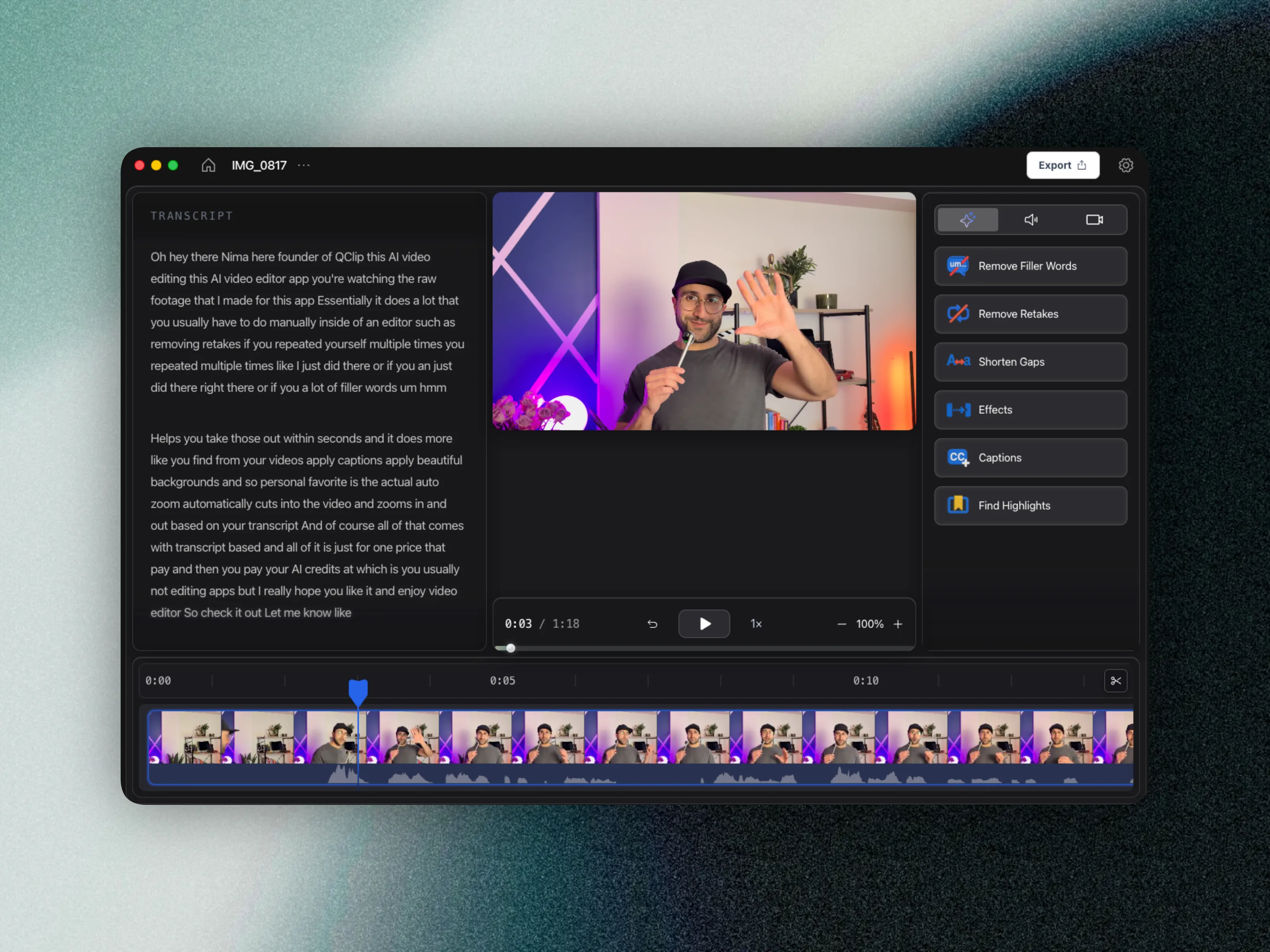
CueClip is a course-production editor that also records on macOS. After capture (or import), the transcript is the edit surface: remove filler words, cut retakes, shorten dead air, add captions, and export a lesson you would put behind a paywall.
Where CueClip is stronger
- Production-focused editing for publishable course content
- Long-form speaking cleanup, not just recording
- Better outcomes for lesson quality and pacing
- Workflow designed for educational production cycles
- Lifetime ($149) or $19/month pricing for recurring publishers
Feature differentiation table
This is the practical side-by-side view for people comparing Loom alternatives, CueClip pricing, and long-form course editing outcomes.
| Capability | Loom | CueClip |
|---|---|---|
| Primary job | Async record & share | Record + auto-edit course lessons |
| Transcript-first editing | Basic / limited | Core workflow |
| Filler word removal | Limited for production polish | One-click lecture cleanup |
| Retake detection | Manual trim | Built for speaking retakes |
| Captions for publish | Varies by plan/workflow | Generate and burn in |
| Highlight clips | Not the core use case | Built for lesson + promo |
| Best distribution | Instant share link | Export to course platforms |
| Pricing model | Seat / subscription oriented | Lifetime $149 or $19/month |
Pricing and ownership comparison
For educators shipping every week, pricing model and ownership matter as much as features. This is where many creators start searching for a loom alternative in the first place.
| Decision factor | Loom | CueClip |
|---|---|---|
| Base pricing pattern | Loom prices around team seats and plans | CueClip: $149 lifetime or $19/month |
| Cost as lesson volume grows | Share tool cost stays; polish still unpaid labor | Edit time drops; optional BYOK for AI |
| Ownership | Access tied to Loom subscription | Lifetime keeps the app; monthly while subscribed |
| Best economic fit | Teams needing async video messaging | Creators shipping paid weekly lessons |
Why creators switch workflows
- Students confuse rough Loom aesthetics with unfinished course quality.
- Manual cleanup of filler and retakes in a share-first tool does not scale to weekly modules.
- You need burned-in captions, highlight clips, and consistent exports for platforms like Udemy, Maven, or Kajabi.
- You want ownership economics (lifetime or predictable monthly) instead of stacking another subscription solely for polish.
Course editing tool vs Loom: the decision framework
Stay on Loom when the video’s job is communication: a five-minute explanation for a teammate, a quick bug report, or a draft that will never be sold. In those cases, opening a dedicated editor adds delay without increasing outcome quality.
Move to CueClip when the video’s job is product: a lesson, cohort module, or evergreen training asset. A useful rule of thumb from course operators: if someone pays to watch it, plan for transcript-first cleanup. Creators who record in Loom and finish in CueClip often keep both — Loom for async ops, CueClip for the catalog.
On pricing models, Loom’s value is collaboration seats and share workflows. CueClip’s value is edit throughput for educators: $149 lifetime (with starter AI credits) or $19/month, plus optional bring-your-own OpenAI, Claude, or Deepgram key so AI cost stays predictable as lecture volume grows.
Who each tool is for
Loom: Teams sharing fast internal updates and lightweight demos.
CueClip: Creators monetizing polished educational video content.
FAQ: CueClip vs Loom
Can I replace Loom entirely with CueClip?
Only if you do not need Loom’s async collaboration features. Many course creators keep Loom for internal updates and use CueClip for student-facing lessons.
Is CueClip a good Loom alternative for course creators?
Yes when your goal is polished educational video. CueClip is not trying to be a team messaging recorder — it is trying to finish lessons faster.
Does CueClip record like Loom?
Yes. CueClip Desktop on macOS records screen and optional camera/mic, then opens the footage as an editable project for transcript-first cleanup.
How does pricing compare for educators?
Loom is typically evaluated as a team subscription for sharing. CueClip is evaluated as production software: $149 lifetime or $19/month, with included AI credits and optional bring-your-own OpenAI, Claude, or Deepgram key.
Related comparisons and guides
- CueClip vs Screen Studio
- CueClip vs CapCut
- CueClip vs Opus Clip
- CueClip vs Submagic
- How to Edit Course Lectures Fast
- Best Auto-Edit Tools for Course Creators (2026)
- CueClip pricing
Final verdict
Both tools are strong when matched to the right workflow. If your priority is long-form educational editing speed with transcript-led cleanup, CueClip is usually the better fit.