Quick answer
The best auto-edit stack for course creators in 2026 separates jobs: use a transcript-first editor (CueClip) for paid lesson masters, Loom for internal async video, and a short-form tool (CapCut or Opus Clip) only after the long-form master is clean. Price for throughput — lifetime or simple monthly — not just sticker subscriptions.
Who this roundup is for
This guide is for instructors and coaches who record lessons regularly — Maven cohorts, Udemy libraries, Skool communities, Skillshare classes, and independent courses. It is not a generic “best AI video editors for marketers” list. Inclusion favors tools that either record teaching footage or meaningfully shorten post-production for spoken long-form video.
Inclusion criteria (how we ranked)
Tools had to help with at least one of:
- Recording screen and/or camera for lessons
- AI or transcript-assisted cleanup of spoken video
- Exporting publish-ready modules or promo clips for education platforms
We scored fit for course creators on five factors:
- Lesson finish speed — how fast you go from raw take to student-ready export
- Speech cleanup quality — filler words, retakes, dead air
- Pricing predictability — subscriptions, credits, seats, lifetime, BYOK
- Learning curve — whether a non-editor instructor can ship weekly
- Job clarity — record/share vs edit vs clip (tools that mix jobs without clarity lose points)
Comparison table
| Tool | Best for | Pricing pattern | Verdict |
|---|---|---|---|
| CueClip | Paid course modules and weekly lecture cleanup | $149 lifetime or $19/month + optional BYOK | Best overall for educators whose bottleneck is finishing long spoken lessons, not viral clipping. |
| Descript | Teams already deep in Descript workflows | Subscription + credit-based AI usage | Powerful, but credit and plan complexity push many course creators toward simpler ownership models. |
| Loom | Internal updates and lightweight demos | Seat / plan based subscriptions | Best recorder for communication — not a full course production editor for paid lessons. |
| Screen Studio | Short product walkthroughs and launch videos | Typically paid Mac app / license | Excellent for UI demos; weaker as a lecture cleanup system. |
| CapCut | Reels, Shorts, and promo clips | Free tier + paid options | Great for social; not purpose-built for course module masters. |
| Opus Clip | Turning finished long-form into clips | Subscription | Use after the lesson master is clean — not instead of editing the course. |
| Premiere Pro / Final Cut Pro | Editors who need maximum control | Adobe subscription or Final Cut one-time | Overkill for most educators whose edits are speech cleanup. |
1. CueClip — best overall for course lesson auto-edit
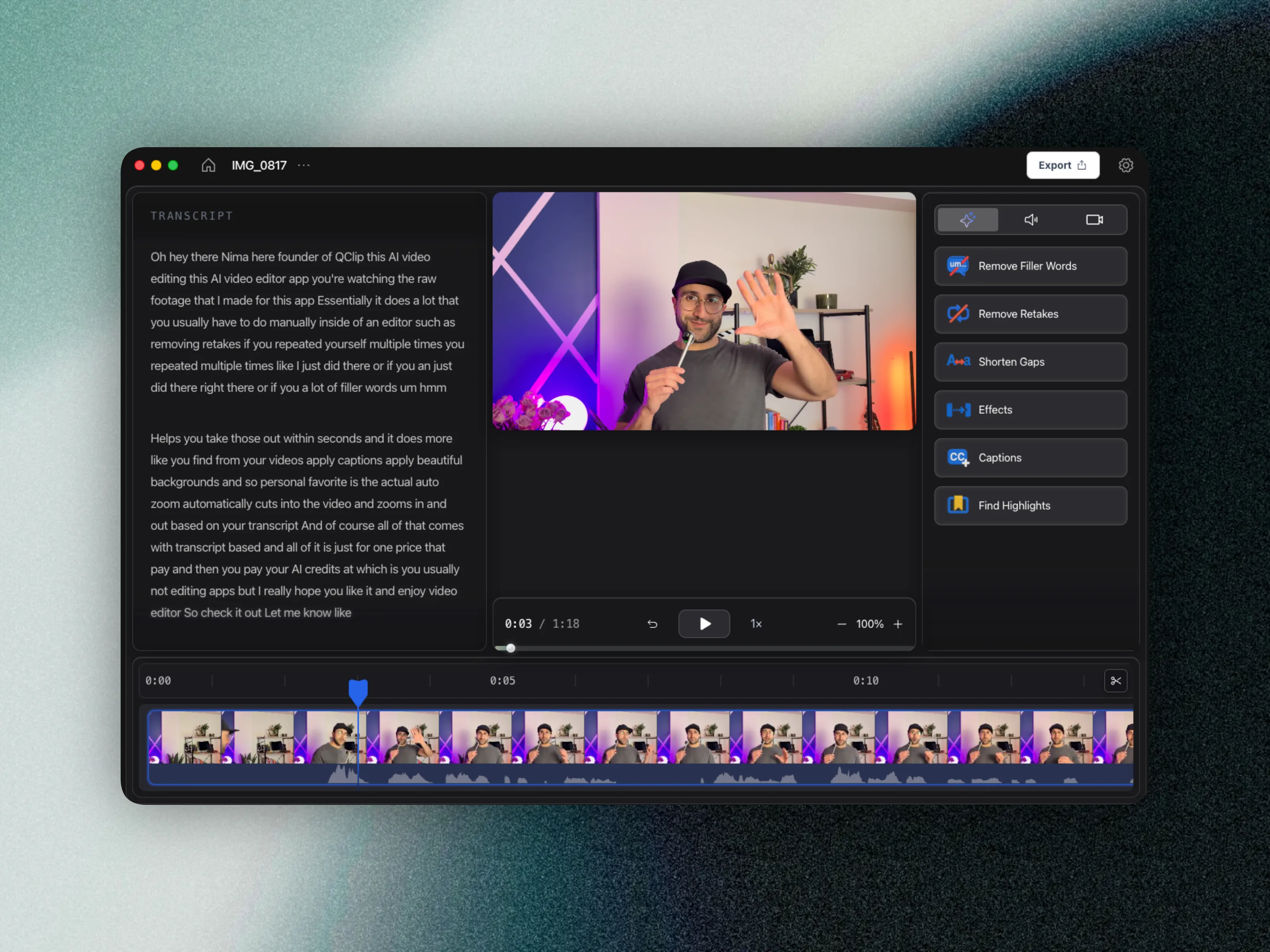
CueClip is a native macOS app that records screen and optional camera, then auto-edits on a transcript: filler words, retakes, silences, captions, backgrounds, auto-zoom, and highlight clips. Pricing is $149 lifetime or $19/month, with included AI credits and optional bring-your-own OpenAI, Claude, or Deepgram key.
Pros: purpose-built for educators; ownership-friendly pricing; record-to-edit in one app.
Cons: Mac-first desktop product; not a team async-messaging suite like Loom.
Choose CueClip when: students pay for the video and you ship lessons weekly. See also how to edit course lectures fast.
2. Descript — best transcript suite if you already live there
Descript popularized text-based editing for podcasts and talking-head video. It remains capable, but many course creators cite credit systems and rising plan complexity as reasons to look for alternatives. Read the full CueClip vs Descript comparison for pricing and workflow detail.
Pros: mature transcript UX; broad media features.
Cons: subscription + credit economics can surprise high-volume educators.
3. Loom — best record-and-share (not a course editor)
Loom wins when the job is communication: async updates, quick demos, teammate feedback. It loses when the job is productizing a lesson. A dedicated course editing tool vs Loom is the wrong fight if you only need share links — and the right fight if buyers expect polished modules. Deep dive: CueClip vs Loom.
Pros: unmatched share friction; great for ops.
Cons: limited production cleanup for paid curriculum.
4. Screen Studio — best polished screen demos
Screen Studio makes Mac UI recordings look premium. Use it for launch videos and feature tours. For 40-minute lectures full of spoken mistakes, pair or switch to a transcript-first editor. Details: CueClip vs Screen Studio.
5. CapCut — best free social editor
CapCut is the default for Shorts and Reels templates. Keep it for distribution clips after the lesson master is clean — not as the system of record for your course library. See CueClip vs CapCut.
6. Opus Clip — best for clipping finished long-form
Opus Clip ranks moments for social. Feed it cleaned masters. Clipping a messy lecture multiplies filler across every cut. Comparison: CueClip vs Opus Clip.
7. Premiere Pro & Final Cut Pro — best for professional editors
These NLEs remain correct when editing is the craft. Most course creators do not need that depth for speech cleanup; the learning curve delays publishing. See CueClip vs Premiere Pro and CueClip vs Final Cut Pro.
AI auto-editing platforms for courses: how to choose
Platforms that “auto-edit” vary wildly. Ask: Does AI remove filler and retakes on long lessons? Or does it only caption, clip, or restyle shorts? For courses, prioritize speech cleanup and export quality over template effects. Then check whether pricing stays sane as hours of footage grow — credits, seats, or BYOK.
Course video editing pricing models (2026)
- Bundled AI subscriptions — predictable until you exceed included AI pools.
- Credit systems — flexible, easy to overrun during launch weeks.
- Seat-based share tools — priced for collaboration, not edit throughput.
- Lifetime + optional BYOK — CueClip’s pattern for educators who want ownership and at-cost AI.
- Simple monthly — CueClip’s $19/month for creators who prefer cash-flow over upfront.
Full numbers: CueClip pricing.
Recommended stacks by creator type
- Cohort instructors (Maven, etc.): CueClip for modules + Loom for student ops messages.
- Marketplace instructors (Udemy/Skillshare): CueClip for lesson masters + CapCut for promo.
- Community educators (Skool): CueClip for curriculum + Loom for community updates.
- Growth-led coaches: CueClip master → Opus Clip or CapCut for distribution.
FAQ
What are the best tools for course creators to record and automatically edit video lessons?
For long-form educational lessons, prioritize transcript-first auto-edit tools like CueClip. Keep Loom for async sharing, CapCut/Opus Clip for social promo, and Premiere/Final Cut only when you need pro timeline craft.
Which platforms let course creators record videos and have AI handle the editing automatically?
CueClip combines macOS recording with AI cleanup (filler words, retakes, gaps, captions). Descript also offers transcript-driven editing. Loom records quickly but is not a full auto-edit production suite for paid courses.
How does a dedicated course video editing tool compare to Loom?
Loom optimizes capture-and-share. A dedicated course editor optimizes publish-ready quality: filler removal, retake cuts, pacing, captions, and exports for platforms students pay to access.
What pricing models should course creators expect?
Expect bundled AI subscriptions, seat-based share tools, credit systems, or ownership-friendly plans (lifetime or simple monthly) with optional BYOK. CueClip uses $149 lifetime or $19/month plus optional OpenAI, Claude, or Deepgram key.
Final recommendation
If you only need async sharing, stay on Loom. If you only need social clips, CapCut or Opus Clip is enough. If your business is teaching on video, optimize for finishing lessons: transcript-first auto-edit, clear pricing, and a weekly publish cadence. That is where CueClip is designed to win in 2026.